01. Overview
ThreatAI gives one control plane to operators and one safe window to tenants.
ThreatAI is a multi-tenant fraud detection and risk decisioning platform built for teams that need to onboard tenants safely, evaluate events in real time, and respond with structured workflows instead of fragmented tools.
Product
Realtime detection and response
Ingest onboarding, login, payment, and behavioral events, evaluate them instantly, and escalate the right decision.
Users
Operators and tenants
Platform teams manage policy globally while tenants get scoped dashboards, rule visibility, and case access.
Infrastructure
.NET, React, PostgreSQL, Redis
The platform is built for production-style operation with separate apps, realtime alerts, and durable persistence.
Product Screens
Real product views from the admin and tenant experiences.
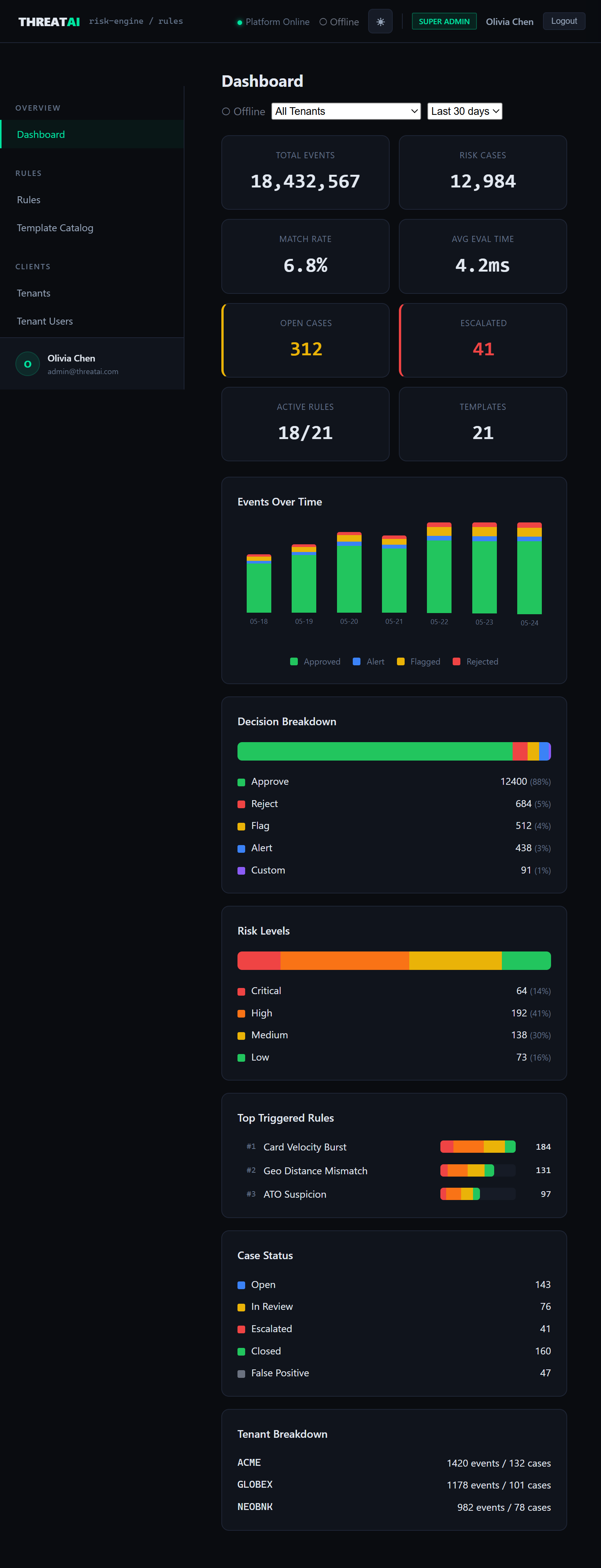
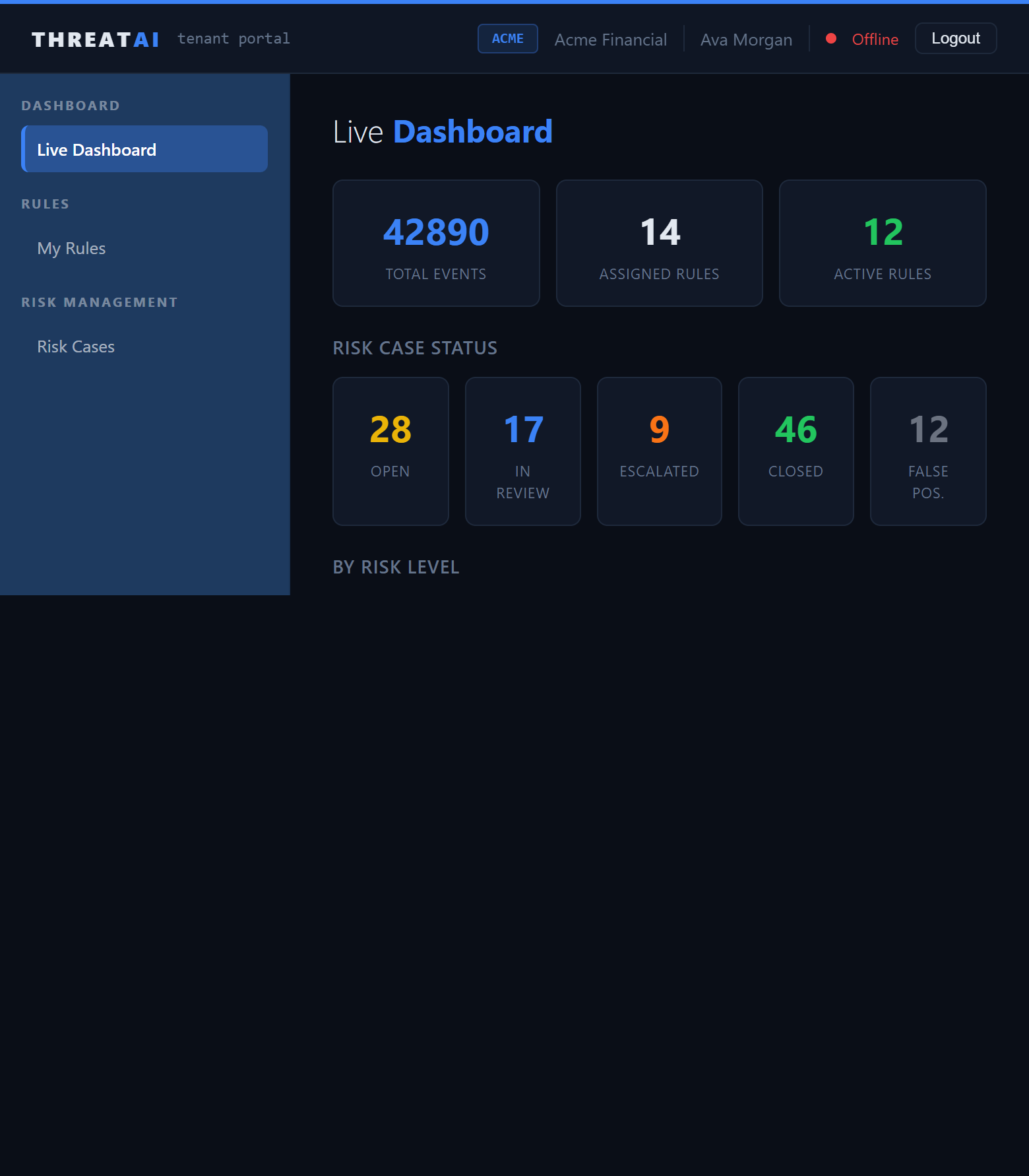
These screenshots come from the actual ThreatAI frontends. They show how the product presents platform-wide operations for internal teams and a scoped operating view for tenants.
02. Architecture
The platform is split into a clear operator layer, tenant layer, and decisioning core.
Use the diagram below as the mental model for how ThreatAI is organized in deployment and in daily use.
Client Tier
- Admin Portal for SuperAdmin and Analyst users
- Tenant Portal for TenantAdmin and TenantViewer users
- SignalR-enabled realtime dashboards and alerts
↓
API Tier
- Authentication, tenants, rules, templates, events, cases, notifications
- Rule engine with recursive condition groups and list-aware operators
- Realtime alert broadcasting through SignalR
↓
Data Tier
- PostgreSQL for durable application data
- Redis for list-backed and performance-sensitive workflows
- Additive schema evolution for ongoing platform growth
Stack
Current deployment shape
Admin React 18 + Vite Portal React 18 + Vite API .NET 8 Web API State PostgreSQL + Redis03. Event Flow
Every event moves through a repeatable path from ingestion to operator action.
ThreatAI is designed so every decision can be explained, reviewed, and acted on. The HTML guide includes both a visual summary and an ASCII-style operational flow.
Decision ladder
Priority always resolves cleanly
`APPROVE < CUSTOM < ALERT < FLAG < REJECT`
Case creation
Non-approve outcomes become workflows
Matched rules can create risk cases automatically and push live alerts to connected clients.
ASCII flow section
SDK / API client
    |
    v
POST /api/v1/events/{tenantId}/ingest
    |
    +--> validate tenant and request context
    +--> flatten payload into rule-friendly fields
    +--> infer entity type from event name
    +--> evaluate active rules for that tenant
    +--> select the strongest matched action
    +--> store event log with evaluation results
    +--> create risk case for non-APPROVE outcomes
    +--> push realtime alert to dashboards and portal
Use this as the fast mental model for debugging ingestion, rule behavior, or missing case creation.
04. Tenant Onboarding
Onboard a tenant in a sequence that minimizes risk and reduces setup drift.
This is the most practical sequence for standing up a new tenant with baseline controls, portal access, and a verified event path.
Create the tenant
Add tenant identity, contact details, code, plan, and activation settings inside the admin portal.
Confirm API credentials
Generate or verify the tenant API key so event ingestion can begin immediately after provisioning.
Assign baseline controls
Deploy common templates or attach standard global rules before any tenant-specific customization.
Add tenant-specific policy
Create custom rules and rule lists when a tenant has patterns that should not apply to the wider platform.
Create tenant users
Provision `TenantAdmin` and `TenantViewer` accounts so the tenant can access a scoped portal experience.
Send test traffic
Use the API, scripts, Postman collection, or RiskKit example to confirm ingestion, decisioning, and case creation.
05. Admin Operations
The admin portal is where operators manage policy, cases, and tenant health.
The admin application is the platform control plane. It is optimized for policy changes, review workflows, and tenant-level governance.
Dashboard
Live operating view
Monitor total events, cases, decisions, response times, and tenant-level activity with live SignalR updates.
Rules
Policy authoring and simulation
Create rules, test them, version them, roll them back, and review the full audit trail for every change.
Templates
Baseline controls at speed
Use production-ready templates to accelerate onboarding and reduce the need to start from empty policy surfaces.
Tenants
Customer setup and access
Create tenants, manage API keys, assign rules, and control how each tenant interacts with the platform.
Risk Cases
Structured review workflow
Filter cases, review evidence, add remarks, assign ownership, and move work through the status lifecycle.
Notifications
Operational communication
Manage channels, templates, bindings, and delivery logs so important alerts reach the right people.
ASCII operator loop
Observe dashboard
    -> review alert
    -> inspect matched rule(s)
    -> open case details
    -> add remark / assign owner
    -> refine rule or list if pattern repeats
    -> redeploy with simulation if needed
06. Tenant Portal
Tenants get visibility and control without seeing anything outside their own environment.
The tenant portal is intentionally bounded. It gives customer teams a useful operational view while preserving multi-tenant isolation.
Tenant Dashboard
Live alertsShows recent activity, active rules, and case volume in a simplified tenant-scoped view.
- recent risk activity
- current rule coverage
- status snapshots
My Rules
Scoped policyHelps tenant teams understand what controls are protecting their environment without exposing global platform logic.
- assigned rules
- custom rule awareness
- policy transparency
Risk Cases
Case reviewTenants can review and manage their own suspicious activity without touching any other tenant's records.
- tenant-only case lists
- status visibility
- remarks and follow-up
Tenant Roles
Access modelUse tenant roles to separate management capability from read-focused visibility.
- `TenantAdmin` for operational control
- `TenantViewer` for bounded access
- JWT scoped by tenant identity
07. Rules and Lists
ThreatAI translates policy into deterministic decisions with versioning, templates, and list-based controls.
Start with templates, then layer global rules, tenant-specific rules, and rule lists only where they add operational clarity.
Rule structure
Conditions plus actions
Each rule combines recursive `AND` and `OR` conditions with one or more actions that define what happens on match.
Templates
Strong starting point
ThreatAI includes 21 production-ready templates across fraud, security, compliance, bot, and advanced detection areas.
Rule lists
Fast changes without rule rewrites
Use `in_list` and `not_in_list` to operationalize allow, deny, and watch logic for IPs, devices, users, and more.
Custom scope
Tenant-specific behavior
Global rules can coexist with tenant-custom rules so shared governance never blocks tailored protection.
- Deploy templates before building many custom rules from scratch.
- Use rule lists for quick operational changes.
- Simulate important rule edits before activation.
- Keep reject rules intentional and well-audited.
08. Troubleshooting
When something looks wrong, use the flow to isolate where the break happened.
Most operational issues fall into a few predictable categories: ingestion, rule activation, case creation, authentication, or realtime connectivity.
No events in dashboard
Verify the API is running, the tenant and API key are valid, and requests are reaching the ingest endpoint.
- check API on port `5062`
- verify tenant credentials
- confirm payload delivery
No risk cases created
Check whether the matched action is stronger than `APPROVE` and whether the rule is active for the target tenant.
- confirm action type
- confirm tenant activation
- confirm referenced fields exist
Tenant user cannot sign in
Validate the tenant user record, role assignment, and portal-to-backend configuration.
- user exists
- role is correct
- portal points to the right API
Realtime alerts missing
Inspect SignalR connectivity, browser console errors, and frontend origin or networking issues.
- check websocket connection
- review console output
- verify origin and CORS setup